The Windows NT API is the lowest level of user-mode interaction with the operating system. While most developers use the Win32 API (CreateFile, ReadFile), these functions are ultimately wrappers around the underlying NT system calls (NtCreateFile, NtReadFile).
Hooking these functions is a powerful technique used by EDRs, sandboxes, and reverse engineers to monitor or alter system behavior at the source. In this post, we’ll explore how to build a framework to intercept these calls using a combination of reflective injection and inline hooking.
The complete project is available at github.com/scrymastic/hook-nt.
Architecture Overview
HookNt consists of two primary components:
- The Injector (
hooknt.exe): Creates the target process in a suspended state, injects the hook DLL, and coordinates the patching process. - The Hook DLL (
ntdlln.dll): Contains our custom implementation of the NT functions and the logic for logging parameters.
The following sequence diagram illustrates the interaction between the injector, the target process, and our hook DLL:
sequenceDiagram
   participant User
   participant HookNt as hooknt.exe
   participant Target as Target Process
   participant NTDLL as ntdll.dll
   participant NTDLLN as ntdlln.dll

   User->>HookNt: Launch with target process & functions
   HookNt->>Target: Create suspended process
   HookNt->>Target: Inject ntdlln.dll

   loop For each function to hook
      HookNt->>NTDLL: Locate original NT function
      HookNt->>NTDLLN: Locate -N hook function
      HookNt->>NTDLLN: Locate trampoline variable

      HookNt->>Target: Allocate trampoline memory
      HookNt->>NTDLLN: Save trampoline address
      HookNt->>NTDLL: Patch to jump to -N function
   end

   HookNt->>Target: Resume process

   Note over Target,NTDLLN: When NT function called:
   Target->>NTDLL: Call NT function
   NTDLL->>NTDLLN: Jump to -N function
   NTDLLN->>NTDLLN: Log parameters
   NTDLLN->>NTDLL: Call via trampoline
   NTDLL->>NTDLLN: Return result
   NTDLLN->>NTDLLN: Log result
   NTDLLN->>Target: Return to caller
Step 1: Reflective DLL Injection
To hook a process, our code must reside within its memory space. We use Reflective DLL Injection, which involves manually mapping the DLL’s sections into the target process and handling relocations, rather than using the standard LoadLibrary API.
// Mapping sections and handling relocations manually
SIZE_T delta = (SIZE_T)(remoteDllBase - ntHeaders->OptionalHeader.ImageBase);
if (delta != 0 && ntHeaders->OptionalHeader.DataDirectory[IMAGE_DIRECTORY_ENTRY_BASERELOC].Size) {
    // ... Iterate through relocation blocks and patch addresses ...
}
This technique is stealthier and gives us more control over the injection process.
Step 2: The Art of the Absolute Jump (x64)
In 32-bit (x86), a simple JMP (5 bytes) is enough to reach any address. In 64-bit (x64), however, the memory space is vast, and a relative jump might not reach our hook if it’s too far away.
We use a 14-byte absolute jump using the push + ret technique:
push low_32_bits
mov [rsp+4], high_32_bits
ret
This allows us to jump to any 64-bit address without clobbering registers (other than the stack pointer temporarily).
Step 3: Calculating Patch Size with DiStorm
When we overwrite the start of a function with our 14-byte jump, we might “cut” an instruction in half. This would crash the program if we ever tried to execute the remaining fragments.
To solve this, we use the DiStorm disassembler to calculate exactly how many instructions we need to overwrite to reach at least 14 bytes without breaking an instruction.
// Use DiStorm to find instruction boundaries
while (totalSize < 14 && i < decodedInstructionsCount) {
    totalSize += decodedInstructions[i].size;
    i++;
}
Step 4: The Trampoline
A trampoline is a small piece of executable memory that contains:
- The original instructions we overrode.
- A jump back to the rest of the original function.
This allows our hook to call the “original” function after logging the parameters.
// Create the trampoline code
BYTE* trampolineCode = new BYTE[patchSize + 14];
CustomMemCpy(trampolineCode, originalBytes, patchSize);
// ... append jump back to originalFunction + patchSize ...
Step 5: Implementing the Hook
Our hook functions use the NTAPI calling convention to match the original NT functions. We log the parameters and then call the original function via our trampoline.
extern "C" NTDLLN_API NTSTATUS NTAPI NtCreateFileN(
    HANDLE* FileHandle,
    ACCESS_MASK DesiredAccess,
    // ... other parameters ...
) {
    printfN("\n[*] NtCreateFile\n");
    printfN("  \\DesiredAccess: %lu\n", DesiredAccess);

    // Call the original function via trampoline
    typedef NTSTATUS(NTAPI* NtCreateFile_proc)(...);
    NtCreateFile_proc trampoline = (NtCreateFile_proc)NtCreateFileTrampoline;
    return trampoline(FileHandle, DesiredAccess, ...);
}
Usage and Results
Using the framework is straightforward:
hooknt.exe test.exe NtCreateFile NtWriteFile
When test.exe attempts to create or write to a file, our framework intercepts the call and logs the details to the console before allowing the operation to proceed.
Demo
Below are screenshots showing HookNt intercepting file operations in a target process.
1. Intercepting NtCreateFile
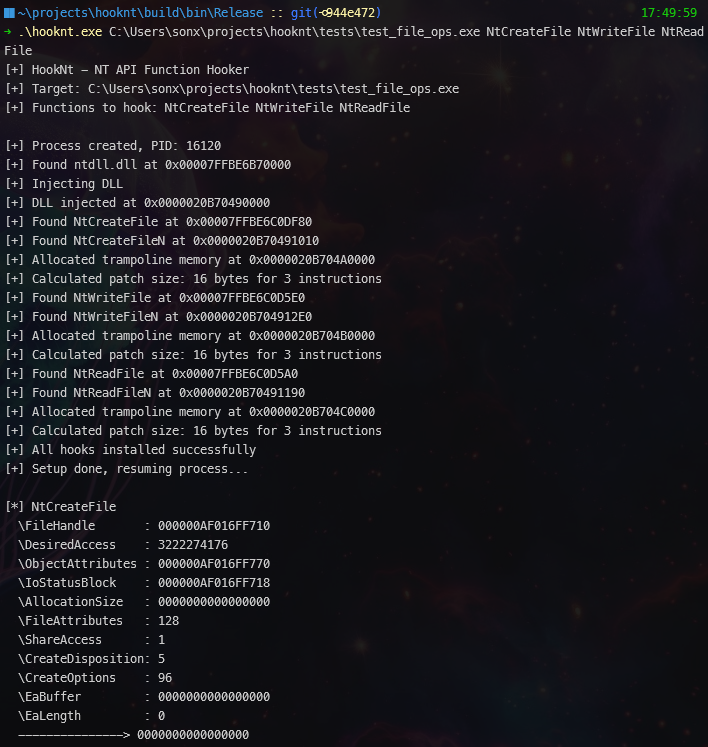 The injector successfully hooking functions and logging the start of NtCreateFile.
2. Logging Parameters and Results
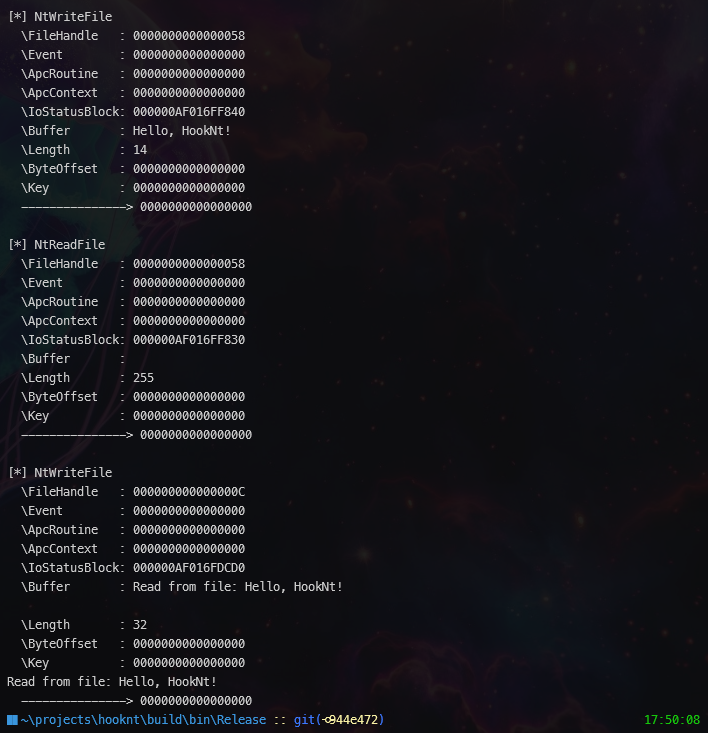 Detailed parameter logging and the return status of the hooked NT functions.
Conclusion
Hooking the NT API provides a window into the lowest levels of Windows operations. By mastering reflective injection, instruction-aware patching, and trampolines, we can build robust tools for monitoring and analysis.